How does Storman work?
As Storman is tailored to Safe storage business, it has features which can be easily adapted to Safe deposit boxes as well, as the basic calculations are the same, which is the rental amount.

Inventory:
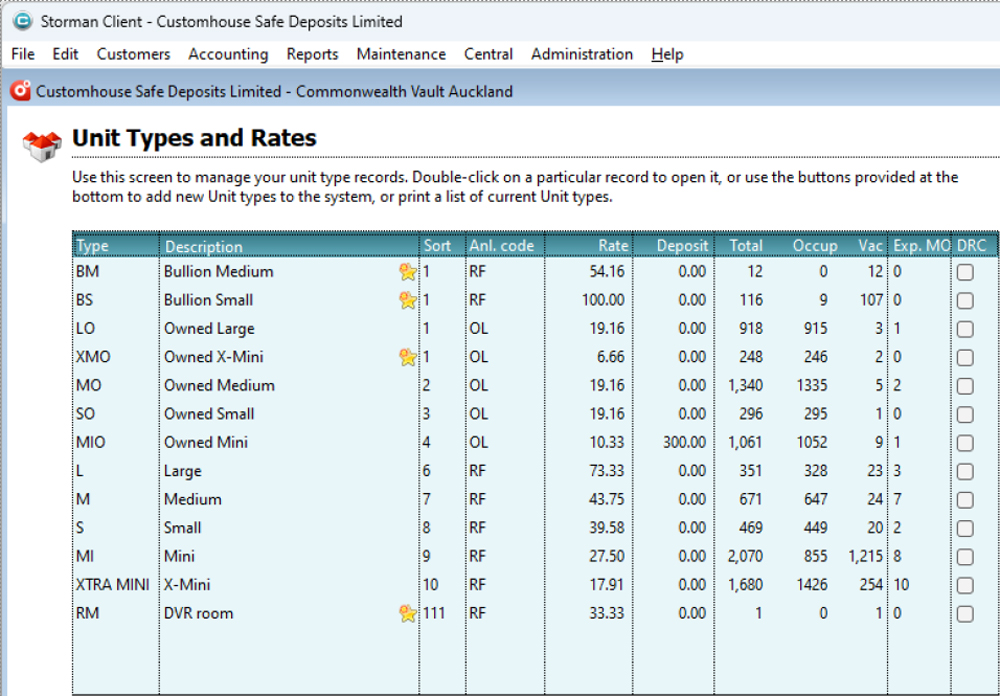
The number of safe deposit boxes are the inventory. As these are stationary, there isn’t any movement of inventory outside of the premises. When the unit is rented, it is classified as “Occupied” and when it is returned/moved out, it is classified as “Vacant”.
Customer Information:
When the customer is onboarded, the first step is entering the agreement details. Customer details include fields like ‘Name’, ‘Address’, ‘Phone number’ etc.


COMPLIANCE
Here the Compliance process is linked. The details provided by the customer need to be captured on to a separate sheet. This typically involves a combination of documents which are pre-defined. Currently, this is done on a spread sheet.


The unique identifier here is the customer code which is different for each customer and should be linked to the agreement number and the unit number. Please note the unit number and agreement could change when the customer changes size or the type of contract; however, the customer code doesn’t change. On the ‘Compliance’ tab, the details of customers such as Photo ID, address proof etc… are to be uploaded. The status of each customer must be shown as ‘Fully Compliant’ etc… Further the level of compliance status needs to be shown.
Information needs to be taken and filled in the customer’s account for AMLCFT purposes:
- Party the service is intended for (individual, company, trust) – to fill in
- Full name – to fill in
- Residential Status ( NZ citizen, NZ Resident, Work/Study Visa, Visitor) – to fill in
- Country of birth/exposure – choose
- Date of birth – to fill in
- Occupation/relevant information KYC – to fill in
- Proof of Address – choose and upload relevant docs
- A statement or letter from a bank
- A letter from a government department or agency, such as the IRD, NZ Police, Department of Justice or the Electoral Commission.
- A statement or letter from a KiwiSaver or superannuation provider
- A house or contents insurance policy.
- A rates or water bill from a local authority.
- A utility bill such as gas, power, fixed phone, internet, TV or an on-account mobile phone.
- A letter from a recognized retirement home that confirms you live there.
- A tenancy or lease agreement signed by the landlord and tenants.
- Other approved by AML CO or duly authorized person
- ID details – choose and upload
- Option 1 One of:
- New Zealand
- Overseas passport (page/s containing name, date of birth, photograph and signature)
- New Zealand firearm license
- New Zealand certificate of identity (as issued under the Passport Act 1992)
- Overseas government-issued national identity card, containing your name, date of birth, photograph and signature
- OR Option 2 :
- New Zealand or Overseas Driver Licence
+ AND One of:
- ATM (Eftpos) card issued by a New Zealand registered bank, provided name and signature are on the card
- Bank account statement issued by a New Zealand registered bank in the 12 months immediately preceding the date of application
- Statement issued by the Inland Revenue Department in the 12 months immediately preceding the date of application
- SuperGold card
- Community services card
- New Zealand or overseas full birth certificate
- New Zealand or overseas citizenship certificate
- OR Option 3 This AND One of:
+ AND One of:
- New Zealand or overseas full birth certificate
- New Zealand or overseas citizenship certificate
- EXPIRY DATE OF ID TO FILL IN (FOLLOW UP DATE IN THE FUTURE)
- The Customer Due Diligence verification: choose one of
- Face to face – tick
- Original documents sighted
- Documents as accepted in line with Proof of Identity Policy
- Current
- True likeness to person presenting
- Proof of address provided
- Legible copies taken and stored/saved
- EDD undertaken if required
- Certified verification
- Certified as to true copy
- Certified as to true likeness
- Certification within last three months
- Referee has signed, dated, and provided name
- Capacity of referee identified (JP, lawyer, notary public)
- Proof of address provided
- Original of certified copy retained
- EDD undertaken if required
- Intended use of services: to fill in or choose
- Primary use of the services…
- Additional services…
- Nature and purpose of the relationship
- Expected frequency of the use/access…
- Additional information for company/trust if needed – tick, choose and upload
- Nature of Trust (e.g. discretionary, family, foreign, investment)
- Trust Deed
- Other parties intended to use:
- Directors
- Shareholders
- Nominee Directors
- Settlors
- Trustees
- PERSONS WITH EFFECTIVE CONTROL
- Beneficiaries
- Persons Acting on behalf
- Source of Wealth/Source of Funds
- Company identifier/Registration numbers
- Trading name, if different
- Description of products/services company supplies
- Other relevant information
- PEPScreening Solution (search check by name)
</table style=”border: 1px solid black; >PEP Results:
- negative/positive
- if a false positive: tick by AML staff
- cleared/not cleared
- approval by AML CO or duly authorized person
- High Risk Monitoring Details, specify (tick):
- The boxholder is a non-resident from Iran, Iraq, Pakistan or Afghanistan or another country that has been identified as a high-risk jurisdiction or under sanctions (Refer to https://www.knowyourcountry.com/country-ratings-table
- Additional users are non-residents from Iran, Iraq, Pakistan or Afghanistan or another country that has been identified as a high-risk jurisdiction.
- The box is being acquired by a person in their capacity as trustee for a trust or director in respect of an asset-holding entity.
- The boxholder has admitted to concealing funds or has said or done something to suggest that.
- The box is being acquired by the company with shares in bearer form or with nominee shareholders or directors.
- The customer has been particularly vague and secretive.
- A large amount of cash or other valuables was sighted.
- The customer is, or is related to, a politically exposed person.
- Section B
- The box is being acquired for use on behalf of a company.
- The customer has been a resident for less than 12 months and immigrated from or was born in a higher risk jurisdiction. (Refer to https://www.knowyourcountry.com/country-ratings-table
- The customer is a long-term resident but retains connections to higher risk jurisidictions.
- The boxholder has advised or has done or said something to suggest that they are acting on behalf of somebody else or holding
documents or valuables for other than themselves.
- Based on the information provided it is not clear why the customer wants a box, or how they are paying for it (taking into account their occupation, stated use and size of box required).
- The customer is taking up more than one box.
- The customer wants to access multiple services? e.g. bullion, as well as a box.
- Other risk factor – please specify:……
If you have answered yes to any of the questions in Section A, you must carry out Enhanced Due Diligence on the customer.If you have answered yes to any of the questions in Section B, you must refer to the AML CO to determine the appropriate level of Customer Due Diligence. Notes/Additional information/Red Flags to fill in if needed….
- Level of CDD to be performed(choose Standard, Simplified, Enhanced)
- Exception granted: tick
- Delayed, need to be completed, further action needed
- Lack of information
- The reason
Compliance status (Compliance staff responsibility, further action needed): chooseOngoing Status (Custodian staff responsibility, further action needed, alarm/notification system as a reminder/follow-up date): choose
- Update POI
- Update Secondary POI
- Update POA
- Update POI & POA
- Check with Compliance Team
- Account review
- Restricted Access
Track of activity and last communication, dates Account Monitoring (for management/ compliance staff only):
- Upload related documentation
- Frequency of the access
- Notes about monitoring
- Comments and decisions of the compliance team
Once a year send notification – please update everythingReporting:Annually we need to extract data for each branch separately.
- The value and number of all transactions settled by your reporting entity during
the year
- Gross number of transactions
- Gross value of transactions
- How many customers are classified as politically exposed persons
(PEP)?
- How many customers are a trust or another vehicle for holding
personal assets?
- How many customers are NewZealand resident entities?
- How many customers are non-residents?
- Residents?
- The total number of safe deposit boxes currently in use?
- The average number of times these boxes are accessed each month.
- The list of countries customers are born/have exposure, number and percentage of those customers
- The list of onboarded customers, their compliance status
- The list of ongoing processes with accounts (how many updated (what kind of updates – collected documentation, addition/deletion, upgrades etc) for a month/half year)
To have an opportunity to filter customers by compliance status
- The list of the exceptions and their status
- The list of the accounts under monitoring and their status
- Not compliant
Types of AgreementsRental – Rental is generally for a minimum period of one year and up to several years. For this purpose, the charges are based on a daily basis, then multiplied by the number of days of rental. Rental is accrued depending on the billing plan selected, eg: Yearly, 2 Years etc…Purchase – Purchase is another option whereas opposed to the rental, the price is fixed, and the only other recurring option is the 6 monthly recurring charges.Rental and Purchase charges:The rental and purchase charges differ as per the size of the box. These are determined when defining the attributes of the sizes.
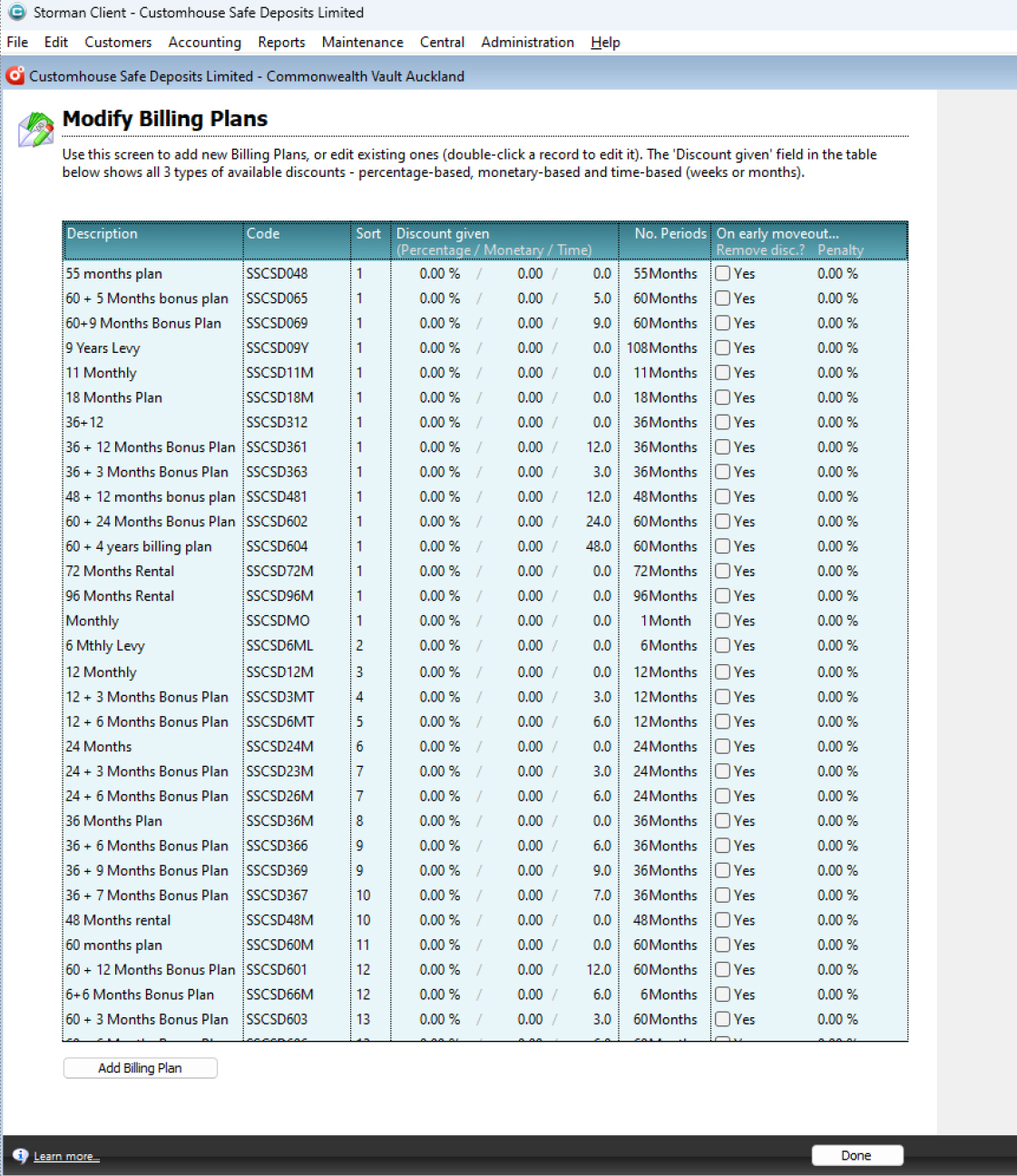
Billing Plans:Next step is to select the rental period, then the unit (which is the inventory) and then the billing is calculated. To suit the requirements of the customer, various billing plans are customized. The billing is however different for Rental and purchase.
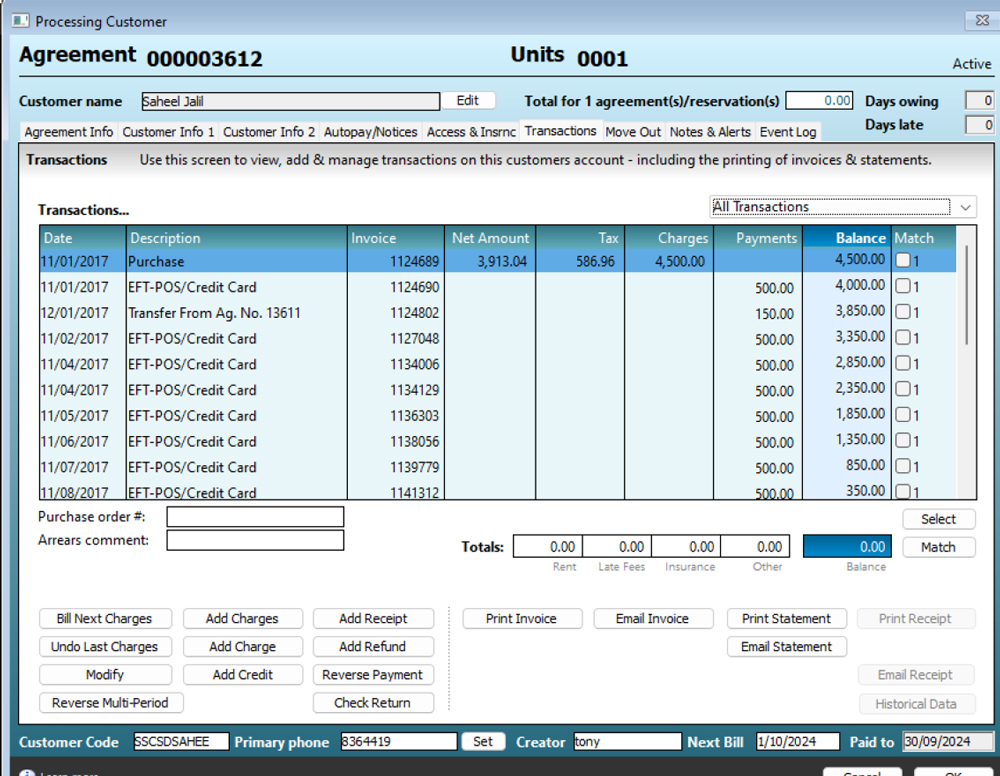
Transactions:Transactions are recorded after choosing a billing plan. The default billing plan is applied if nothing is selected. When ‘Bill Next Charges’ is clicked, the charges are arrived as follows:Rental: Price per month of the size x months as per ‘Billing Plan’. For example, Size 1 rental is $30 per month, charges will be: $30 x 12 months (if the 12 monthly billing is selected) = $360.Purchase: For purchase, the fixed price for the size is charged and no other charges.
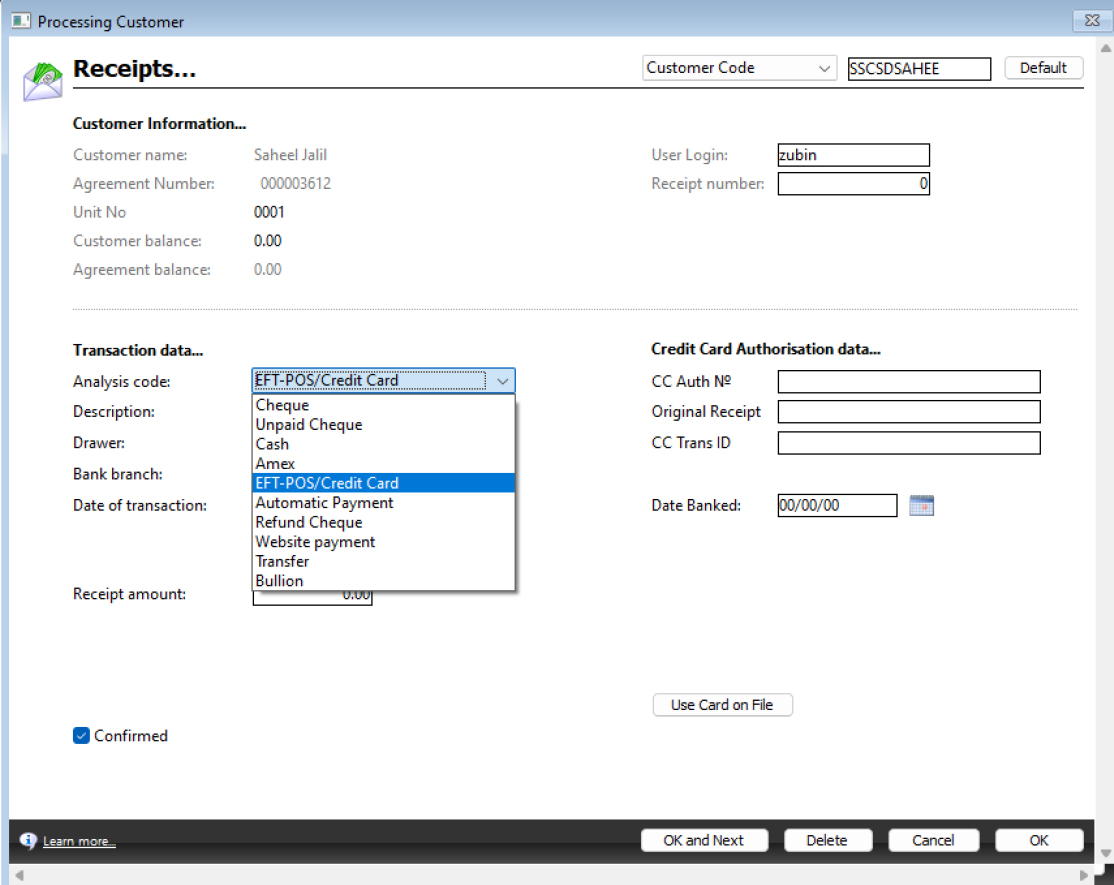
Receipt: Normal receipt process is carried out with the predetermined receipt options.
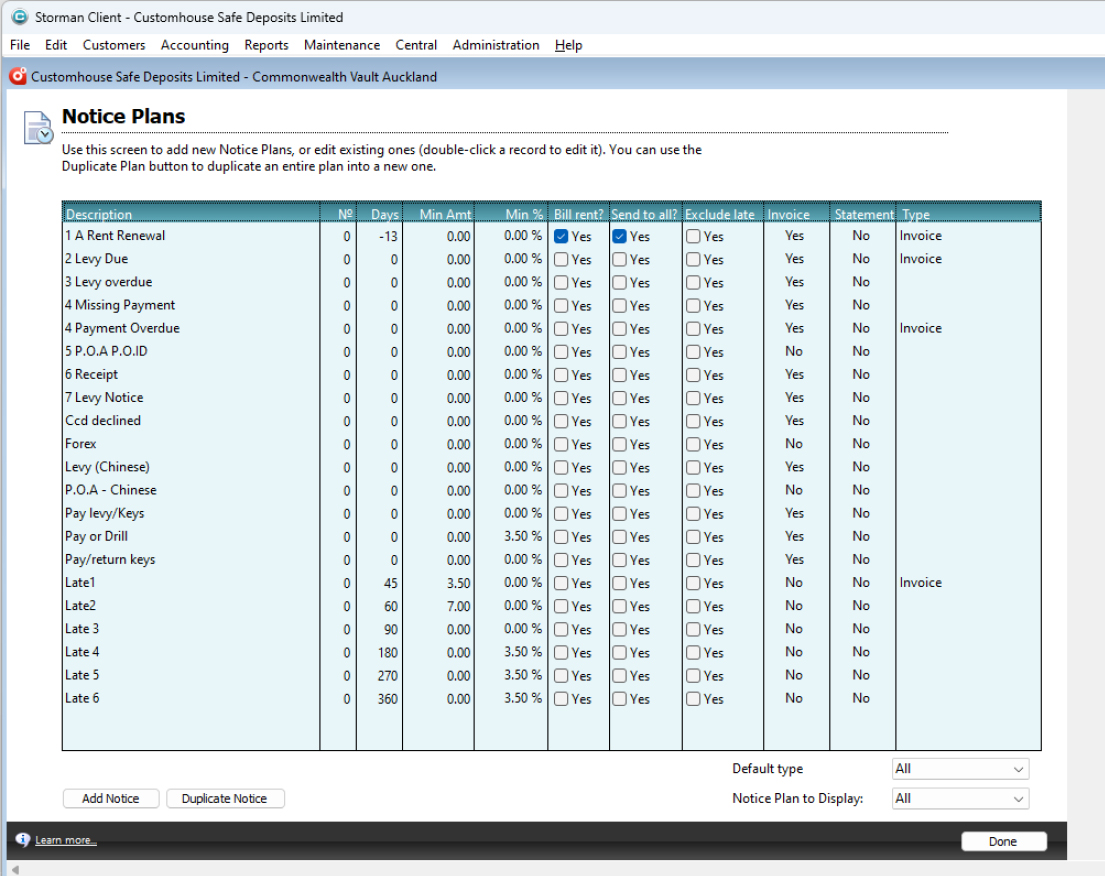
Communications: Here the communication preferences are set (e-mail, SMS etc..) and the history of communication is also shown. From here we can initiate an e-mail or SMS to the customer. Various communication notices can be customized and selected before we edit the e-mail. Attachment options include Invoice, Statement etc…
Move-out/Closure: An agreement is closed which is also referred to as ‘Move-out’ when typically, the customer decides to end the contract, or it comes to an end after the initial agreed time. There are options to renew the contract for a further predetermined billing period or to move out. When the ‘Move-out’ procedure is carried out, the initial deposit paid is refunded provided there is no money owing, in which case the owing money is adjusted and the deposit remaining, if any, is refunded.
ReportingAccountingReceipts Listing Report: This report is to help reconcile your receipts in Storman to your bank statement. If you use cash accounting, you can also use this report to see the detail lines behind your Income Received Report. If you list this report by date banked, you will see the details behind your Receipts Summary Report. If you list this report by transaction date you will see the details behind your IncomeReceived ReportReceipts Summary Report: This report shows all transactions that have been banked during the requested month. The report shows for each day banked the summary of receipts that were banked on that day.The report also shows adjusting figures:1. Transactions that were created in a prior month but banked in the month selected.
2. Transactions that were created in the month selected, but not yet banked.This report is useful to reconcile your bank statement deposits to the information held in Storman.AuditRental audit Report: This report checks for any anomalies in the billing of Customers. It will pick up Customers where there is a difference between what you would expect to have been billed and what has been billed. The report will pick up things like charges that you would expect to see on an Agreement for that period but are missing from the Agreement’s list of transactions. It would also pick up rental charges that have overlapping dates.You will need to investigate the items that the report picks up and make any necessary changes. A good thing to look at when checking these transactions is the period that the transaction relates to. You can check this by looking at the “Relates to the Period from” dates which can be seen when you open an individual transaction.Credits and Refunds Report: This report shows a full list of the credits and refunds for a specified date range; as well as the amount, the customer they were added to, who by and when.
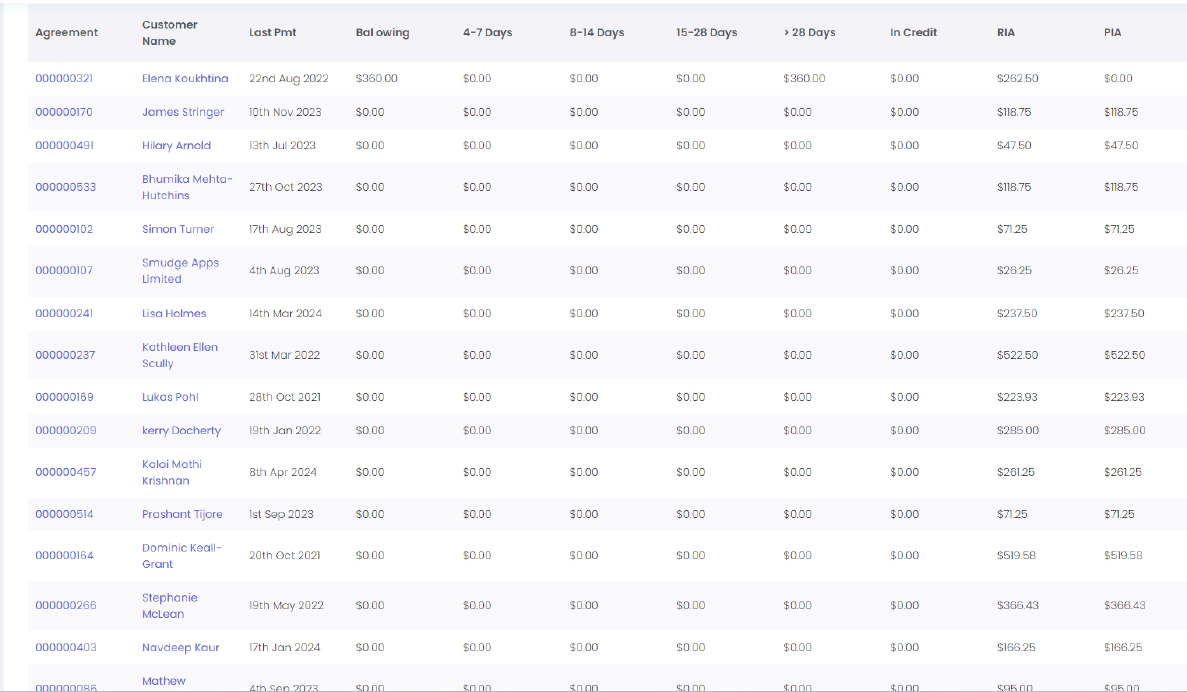
Debt managementAged Receivables Report: This report shows you all active customers who have a balance owing for all their agreements and units, and the number of days the balance has been outstanding for.
Late Cycle Report: This report shows you a list of customers who are overdue and inside their late cycle (they have been sent late notices). If you have overdue customers who have not been sent any late notices (sms, emails, letters) by you, they will not be inside a late cycle and will not be displayed on this report.
Paid to date Report: Use this report to manage debt based on the customer’s paid to date. The report shows every agreement with a balance owing and a paid to date in the past.
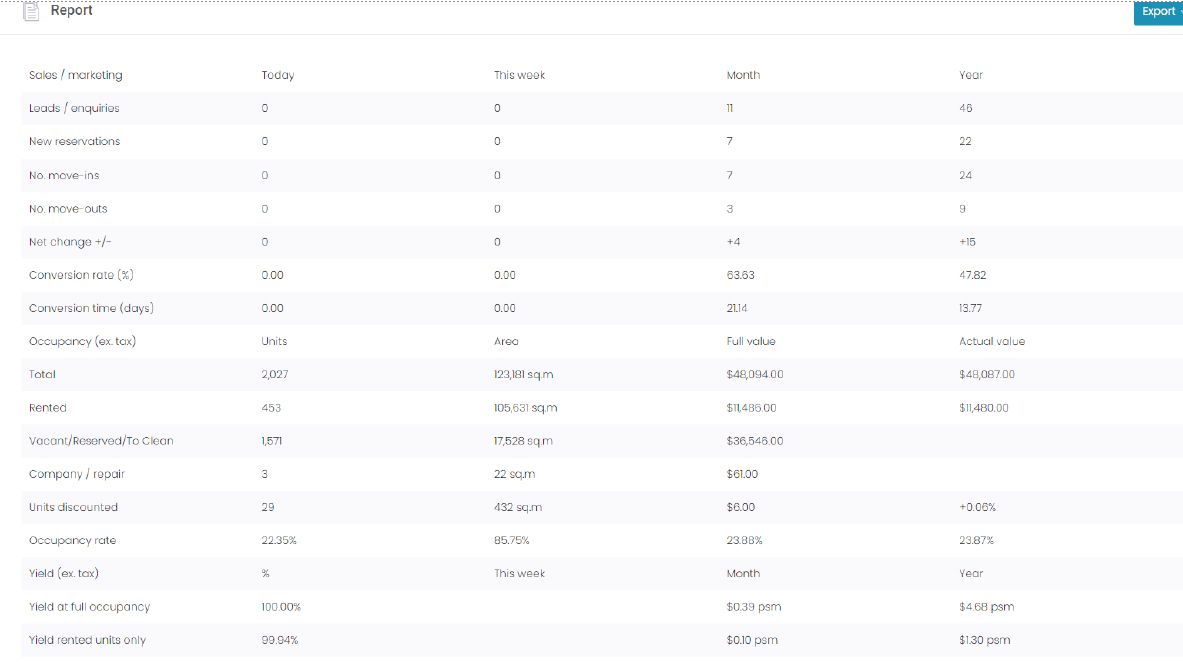
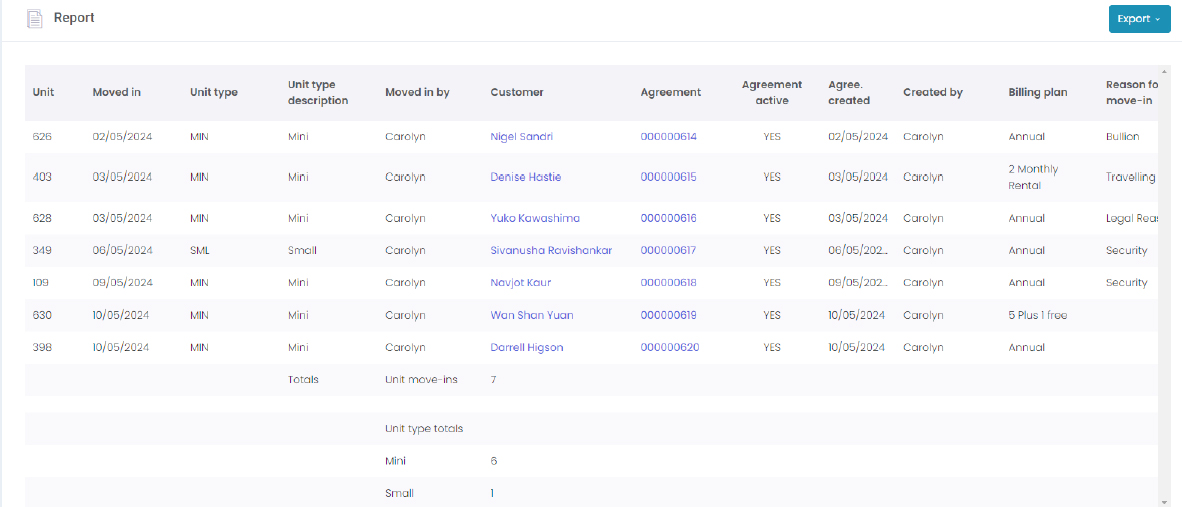
Key Statistics Report: This report provides a snapshot of key facility indicators. It can only be printed for dates up to the day before the last daily processing.
Trending Key Statistics Report: This report is a summary of Income Received, Liabilities, Income Charged and Occupancy Percentages for the date range specified.
Correspondence Config Report: This report is used to show the communication options your customers have opted for or have been configured for, such as:
- the correspondence plan each customer is on
- whether they want to receive automated SMS and emails (via overnight processing)
- whether they want to receive automated emails when their autopay is processed (credit card / bank account)
Correspondence Config Report: This report is used to show the communication options your customers have opted for or have been configured for, such as:
- the correspondence plan each customer is on
- whether they want to receive automated SMS and emails (via overnight processing)
- whether they want to receive automated emails when their autopay is processed (credit card / bank account)
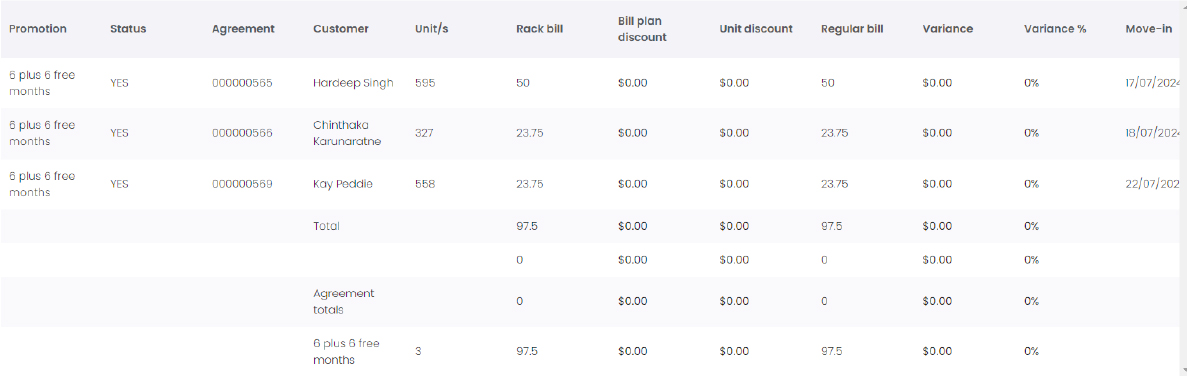
Sales and MarketingBilling Plan Promotion Report: This report shows you all active agreements that are on billing plan promotions; their discount and variance and how long they have been on this promotion.
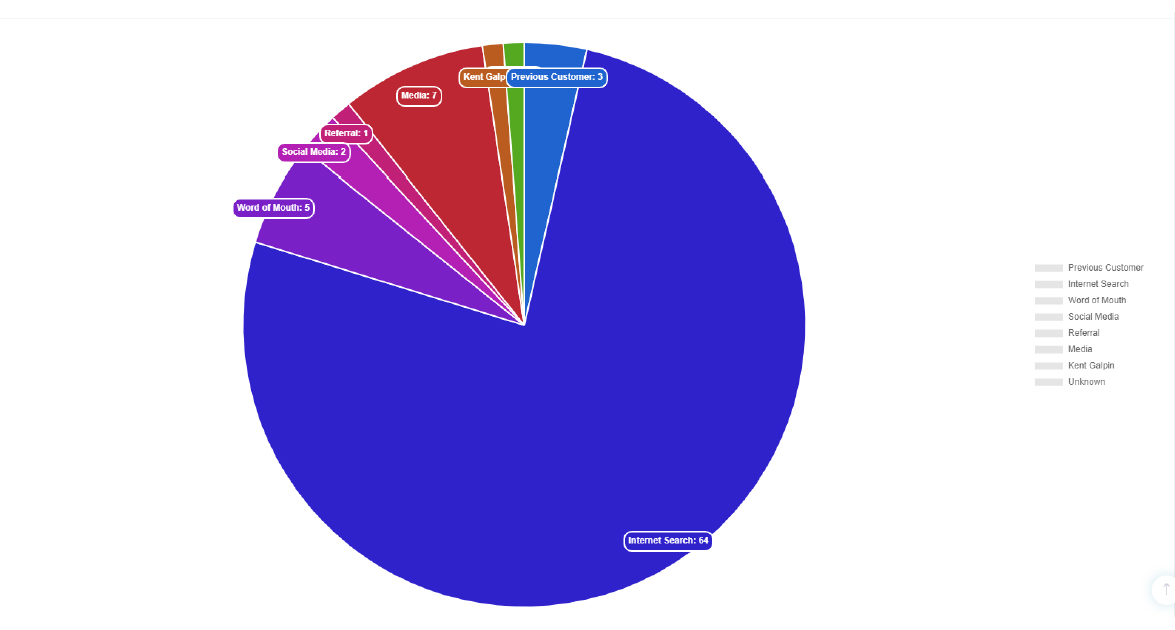
Customer Analysis Report: This graph displays a breakdown of your customers (in pie graph format) using the settings below.
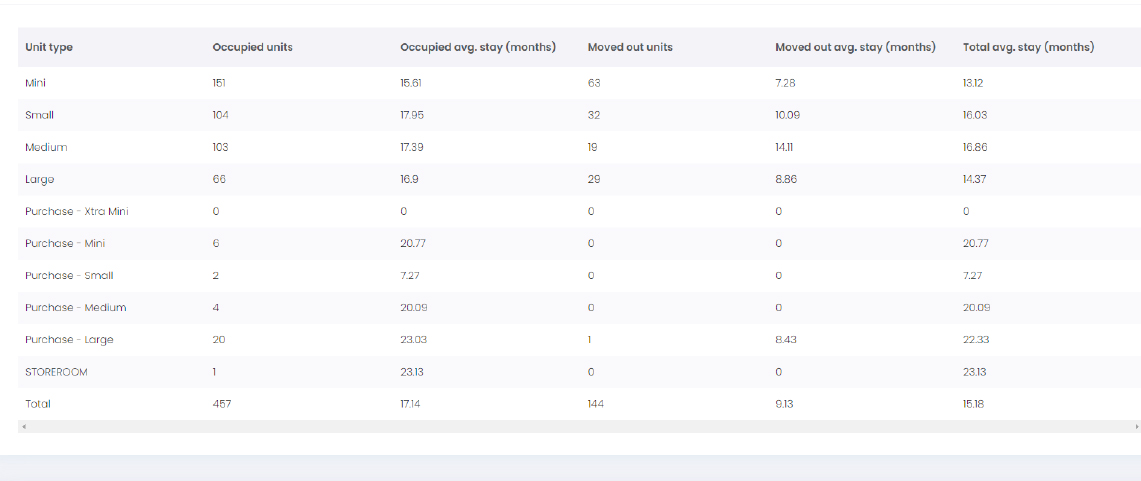
Customer Average Length of Stay Report: This report shows you the average length of stay at your facility based on either Unit type, or the Customer Type.
Lead Analysis Report: This report is useful to analyse your leads.
You can filter the report based on the lead status (open, converted or declined), between two periods:Either the last 12 months, or The last 12 years.
Income Charged Report: This report shows a breakdown of your income charged by item code for the period specified.When running this report using the summarise by item code option, there is no date range limit. When running this report using show all transactions option, there is a date range limit of 3 months.
Income Received Report: This report shows a breakdown of your income received by item code for the period specified.This report can be run for a maximum period of 3 months.
BullionBullion transactions are separate from the safe deposit boxes. Customers doing the bullion transactions may not necessarily be hiring safe deposit boxes, so the customers database should be unique. However, if the safe deposit box customers are buying bullion or vice-versa, there is a need to link them.The current software used is XERO. Inventory: Inventory is first created for various products with the opening stock. The products for bullion are classified as:
Gold bars, Gold coins, Silver bars, Silver coins Sub classification: Bullion and Numismatic (Collectibles)Here there are 2 types of metals – Gold and Silver. Gold could be identified as Metal Type- 1 and Silver as Metal Type – 2Cost price: Cost price is dependent on the gold/silver purchase price and exchange rate at any given time and is not fixed. This is determined by the supplier and is fed into the purchase bill entry. The purchase entry is made when the purchase request is sent to the supplier and is confirmed. The details on the purchase bill are as follows:SPOT Price, Type of metal, Currency, Exchange rate, Supplier, Product, Premium, Metal price, Quantity, Landed cost/Purchase price per product.
 While recording the purchase the branch where the stocks are expected to be stocked is necessary.The status must show: Transit, Branch. This must be linked to inventory management.
 Sale price: The sale price for the products is very dynamic and is dependent on the Spot price and exchange rate.Stock allocation: The stock is allocated according to the First In First Out or the FIFO Method. The profit is calculated depending on the landed cost of the lot. For example, the price for the same product on Lot 1 could be different to the price on Lot 2.Stock Valuation: The stock is valued, not at the cost price but the current price of the gold and silver. So, we can say, like the sale price, it is dynamic and directly dependent on the world gold and silver price and exchange rate.Daily Sales Record: The daily sales sheet is maintained in a spreadsheet and captures all the details of the sale which is not allowed in XERO. This includes, in addition to the basic details, the lot from where the stock has been allocated from, status of the order, delivery status, branch, location, cost price, cost of sales and profit.
 Sales List: This the summary of the daily sales which is created at any point in time and gives us a snapshot of the daily sales and profit. This is currently being done on a spreadsheet.
 Stock Summary: This summarizes the inventory at any point in time and is classified according to the metal type.
 Landed Costs: This gives us a detailed list of stock in hand with specific lot numbers and the price which was paid for that lot.
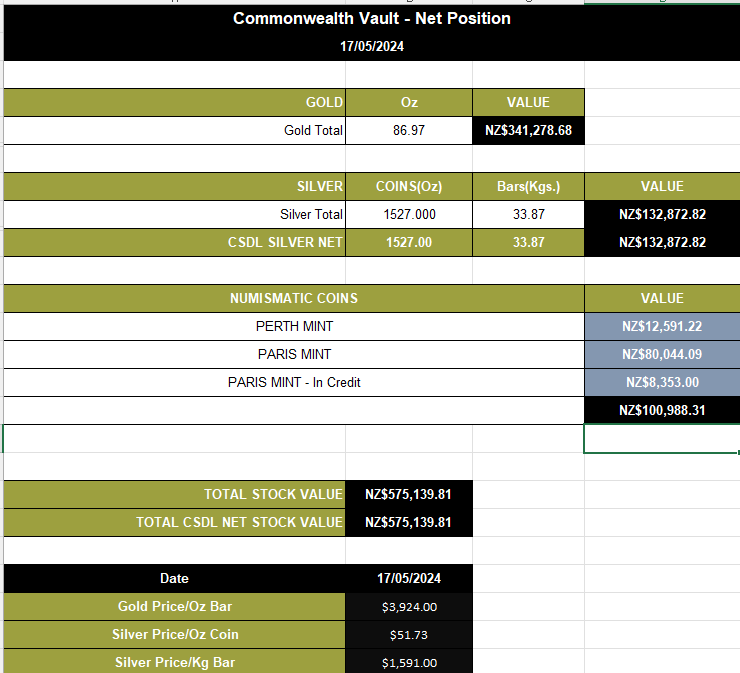
 Bullion position: This tells us the total value of the gold and silver at any time in hand.












 Inventory: Inventory is first created for various products with the opening stock. The products for bullion are classified as:
 Sub classification: Bullion and Numismatic (Collectibles)Here there are 2 types of metals – Gold and Silver. Gold could be identified as Metal Type- 1 and Silver as Metal Type – 2Cost price: Cost price is dependent on the gold/silver purchase price and exchange rate at any given time and is not fixed. This is determined by the supplier and is fed into the purchase bill entry. The purchase entry is made when the purchase request is sent to the supplier and is confirmed. The details on the purchase bill are as follows:SPOT Price, Type of metal, Currency, Exchange rate, Supplier, Product, Premium, Metal price, Quantity, Landed cost/Purchase price per product.
 While recording the purchase the branch where the stocks are expected to be stocked is necessary.The status must show: Transit, Branch. This must be linked to inventory management.
 Sale price: The sale price for the products is very dynamic and is dependent on the Spot price and exchange rate.Stock allocation: The stock is allocated according to the First In First Out or the FIFO Method. The profit is calculated depending on the landed cost of the lot. For example, the price for the same product on Lot 1 could be different to the price on Lot 2.Stock Valuation: The stock is valued, not at the cost price but the current price of the gold and silver. So, we can say, like the sale price, it is dynamic and directly dependent on the world gold and silver price and exchange rate.Daily Sales Record: The daily sales sheet is maintained in a spreadsheet and captures all the details of the sale which is not allowed in XERO. This includes, in addition to the basic details, the lot from where the stock has been allocated from, status of the order, delivery status, branch, location, cost price, cost of sales and profit.
 Sales List: This the summary of the daily sales which is created at any point in time and gives us a snapshot of the daily sales and profit. This is currently being done on a spreadsheet.
 Stock Summary: This summarizes the inventory at any point in time and is classified according to the metal type.
 Landed Costs: This gives us a detailed list of stock in hand with specific lot numbers and the price which was paid for that lot.
 Bullion position: This tells us the total value of the gold and silver at any time in hand.